What the export contains
Download ZIP exports the files needed to fabricate and assemble the sensor, configure its readout, and reopen the design. The archive separates the board fabrication files, sensor metadata, cutting templates and printable case parts as follows.
| File | What it is | Used for |
|---|---|---|
gerber/ |
Gerber layers and the drill file | ordering the flex PCB (Order the sensor) |
board.kicad_pcb |
the board in KiCad format | inspecting or editing the board in KiCad |
board.kicad_pro, board.kicad_dru |
the design rules the board was generated to, and two scoped exceptions (the gold fingers reach the tab edge; a taxel's electrodes sit the electrode gap apart) | KiCad's DRC: the board passes it with no errors |
tactile_pixel_*.kicad_mod |
the taxel footprint | opening the board in KiCad |
manifest.json |
machine-readable description of the sensor | the readout, the viewer, simulation and transfer |
design.json |
the design itself: outline, settings and hand-edited routes | reopening the design in OpenTac-CAD |
printable_1to1.pdf |
full-size paper template of the board | checking the fit before ordering |
velostat/velostat_cut.dxf |
outline of the sensing area, in mm | laser-cutting the piezoresistive layer |
velostat/velostat_fold_template.pdf |
the same outline, mirrored about a fold line | cutting the piezoresistive layer by hand |
case/*_case_bottom.stl |
the bottom of the printed case | 3D printing |
case/*_case_top_bumps.stl |
the lid with shear-sensing bumps | 3D printing |
case/*_case_top_flat.stl, case/*_case_top_hatched.stl |
the flat and hatched lids, which fit the same bottom | 3D printing |
case/README.txt |
which lid is the primary one, the case settings used, and any warnings | choosing what to print |
The * is the design name. Print the bottom and one lid. The case is built from the settings in the case panel, or its defaults if you have not opened it. The primary lid is the one you last chose there, or the bumped lid if you have not chosen one. The case is added when you press Download ZIP, which takes a few seconds more on a typical board and longer on a large one. If it cannot be built for a design, the ZIP still downloads without it, and a note under the button says why.
Fabrication layers
| File | Layer |
|---|---|
board-F_Cu.gtl, board-B_Cu.gbl |
top and bottom copper: taxel electrodes, columns on top, rows underneath |
board-In1_Cu.g1, board-In2_Cu.g2 |
inner copper, 4-layer boards only: row wiring and notch links |
board-F_Mask.gts, board-B_Mask.gbs |
solder mask (coverlay) openings: the taxels on top, the connector fingers on the bottom |
board-F_Silkscreen.gto |
the design name, printed near the connector |
board-B_Silkscreen.gbo |
the QR code and registration grid (below) |
board-Edge_Cuts.gm1 |
the board outline, including the tail and connector end |
board-User_Drawings.gbr |
the stiffener outline over the connector end |
board-User_Comments.gbr |
the stiffener note, for example 31.6x6 PI stiffener on TOP (taxel side), T = 0.3 total, contacts on BOTTOM |
board.drl |
vias |
Zip the gerber/ folder on its own for the board house. The two User layers are drawing layers: they are not fabricated as copper, they tell the board house where the stiffener goes and how thick the connector end must be.
Sensor geometry and wiring
manifest.json connects sensor design to readout, visualisation, simulation and transfer. For each taxel, it records physical position, scan row and column, footprint, bump group and surface frame; it also records the connector pad assigned to each row and column. These fields allow downstream tools to interpret measurements in the sensor's physical geometry. The readout board stores the sensor's scanning configuration and a manifest identifier; the viewer uses this identifier to retrieve the full manifest from the host. See Manifest for the format.
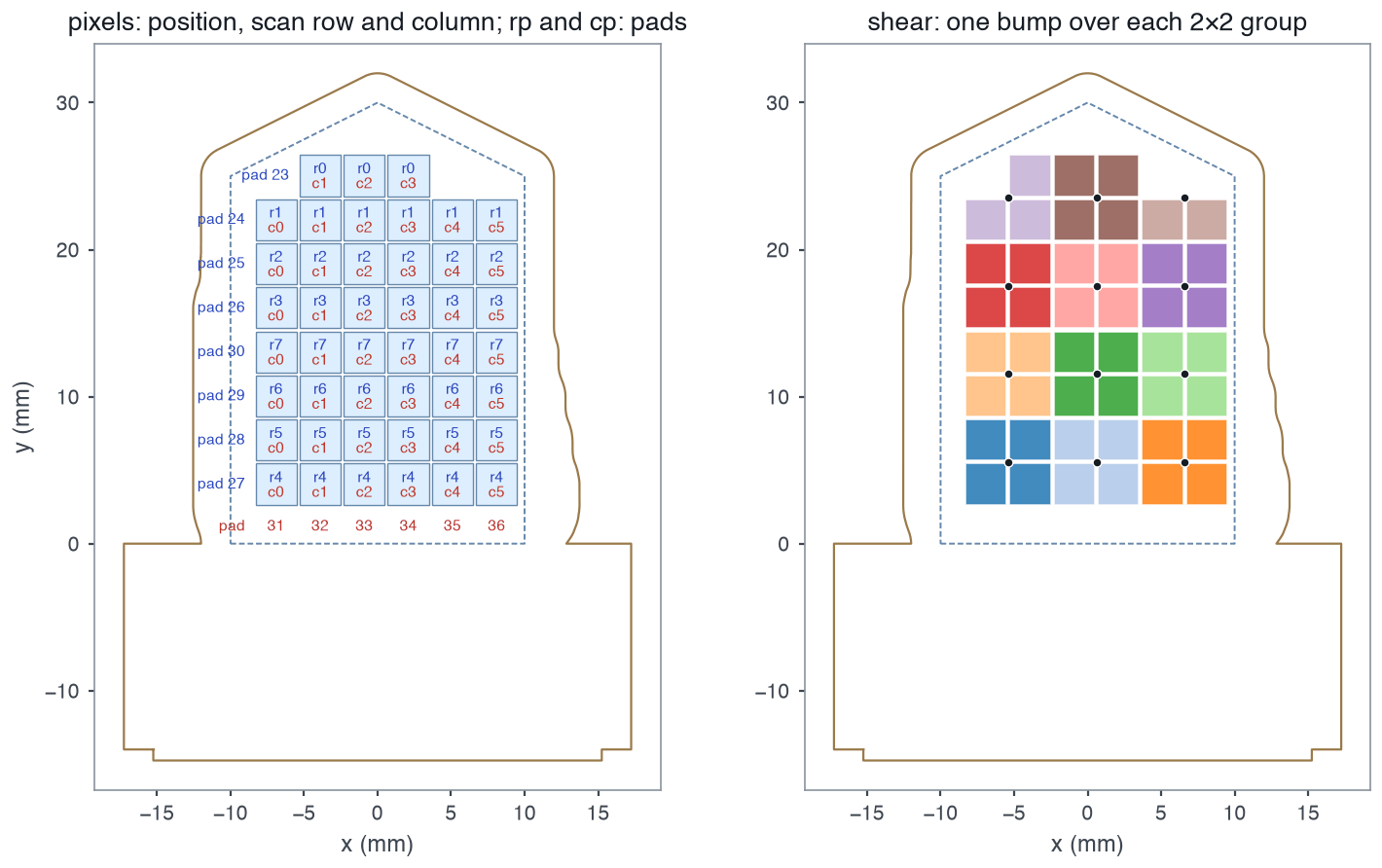
examples/manifests/finger_8x6_60pin.json: each taxel's position, scan row and column, and the pad of every row and column (left); the bump groups (right). Dashed: the drawn outline. Solid: the board edge as cut (edge_cuts).Recovering sensor metadata from the QR code
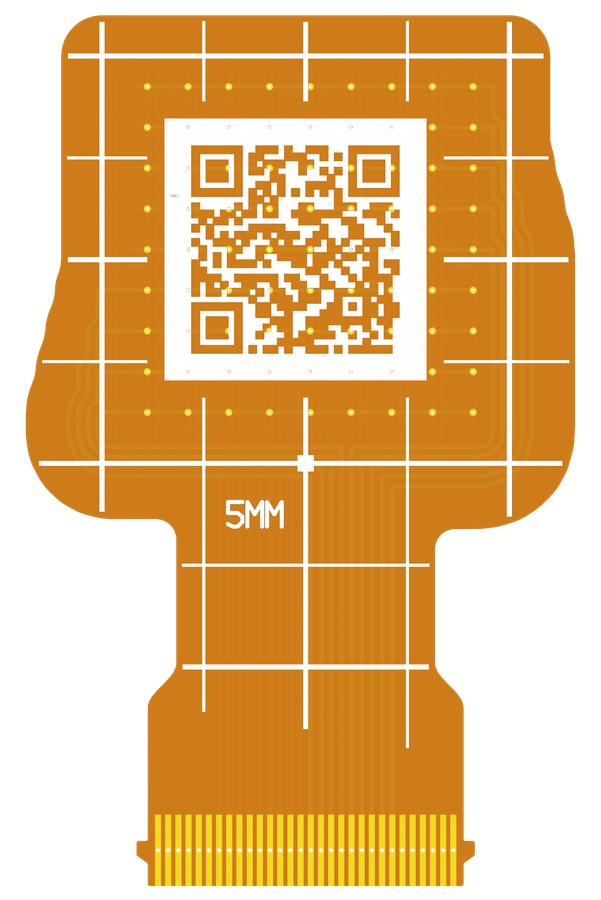
The back silkscreen carries a small QR code and a millimetre registration grid. The QR holds the sensor's taxel core: grid size, pitches, taxel footprint, which connector pad drives each row and column, and which taxels exist. These fields are sufficient to reconstruct the taxel layout and wiring needed for readout. A board that has been separated from its files can be read again from a photo of its back; see Recover a manifest from the QR.
The code is a link, HTTPS://OPENTAC.GITHUB.IO/Q/ followed by the taxel core. Scanned with a phone camera, it opens the QR decoder page, which decodes it in the browser and offers the manifest as a download; opentac manifest from-qr reads the same text. The link is 28 characters longer than the bare taxel core, 1.4 mm more on each side of the code per QR version; on the 31 example designs the code is 12.95 to 18.55 mm square, quiet zone included. A board without room for the link inside its outline gets the bare taxel core instead, which a phone shows as text to paste into the decoder page, and a board without room for that gets no code. The /generate response records which in stats.back_qr: form is link, bare or null, with a warning in warnings when it is not the link. Codes printed before the link, which carry the bare taxel core, still decode.
The registration grid uses the manifest's coordinate frame, allowing positions in a photograph to be related to taxel coordinates. The QR is printed mirrored so that it reads correctly on the physical back of the board; in a top-view Gerber viewer it looks backwards, which is expected.