Flash the firmware
Each readout-board design requires its corresponding firmware build. The table below identifies the prebuilt binaries supplied in the code repository.
| Board | Firmware | File |
|---|---|---|
| 60-pin board | READOUT60 |
firmware/prebuilt/READOUT60.bin |
| 30-pin pair | NODE16 |
firmware/prebuilt/NODE16.bin |
| 30-pin pair in a daisy chain | NODE16 bus node |
firmware/prebuilt/NODE16_bus.bin (daisy chain) |
Firmware is written through the board's USB connection. A board already running OpenTac firmware can enter the STM32 device-firmware-upgrade (DFU) bootloader in response to the B command. A new or unresponsive board must enter the bootloader using BOOT0. Reflashing preserves the stored sensor configuration.
Use opentac flash to install a prebuilt binary. The Arduino IDE and arduino-cli workflows below are useful when compiling or modifying the firmware.
1. Prebuilt firmware with opentac flash
Install one flashing tool:
- dfu-util:
brew install dfu-util(macOS) orsudo apt install dfu-util(Linux). On Linux, also do the one-time setup in On Linux. - or STM32CubeProgrammer, from st.com. Use this on Windows.
Plug the board in by USB, then:
The command identifies the connected board, restarts it in bootloader mode, and writes the corresponding binary from firmware/prebuilt/:
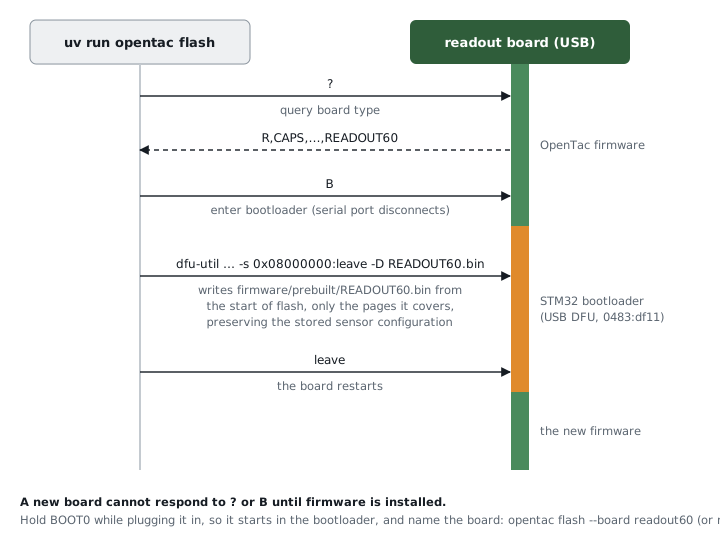
NODE16.bin. With STM32CubeProgrammer instead of dfu-util, only the writing step differs.To see what it would do without changing anything:
A new board has no firmware, so it cannot restart itself into the
bootloader, and opentac flash reports that no board answered and none is
in the bootloader. Unplug it, hold the BOOT0 button while plugging it back in,
release it, and name the board:
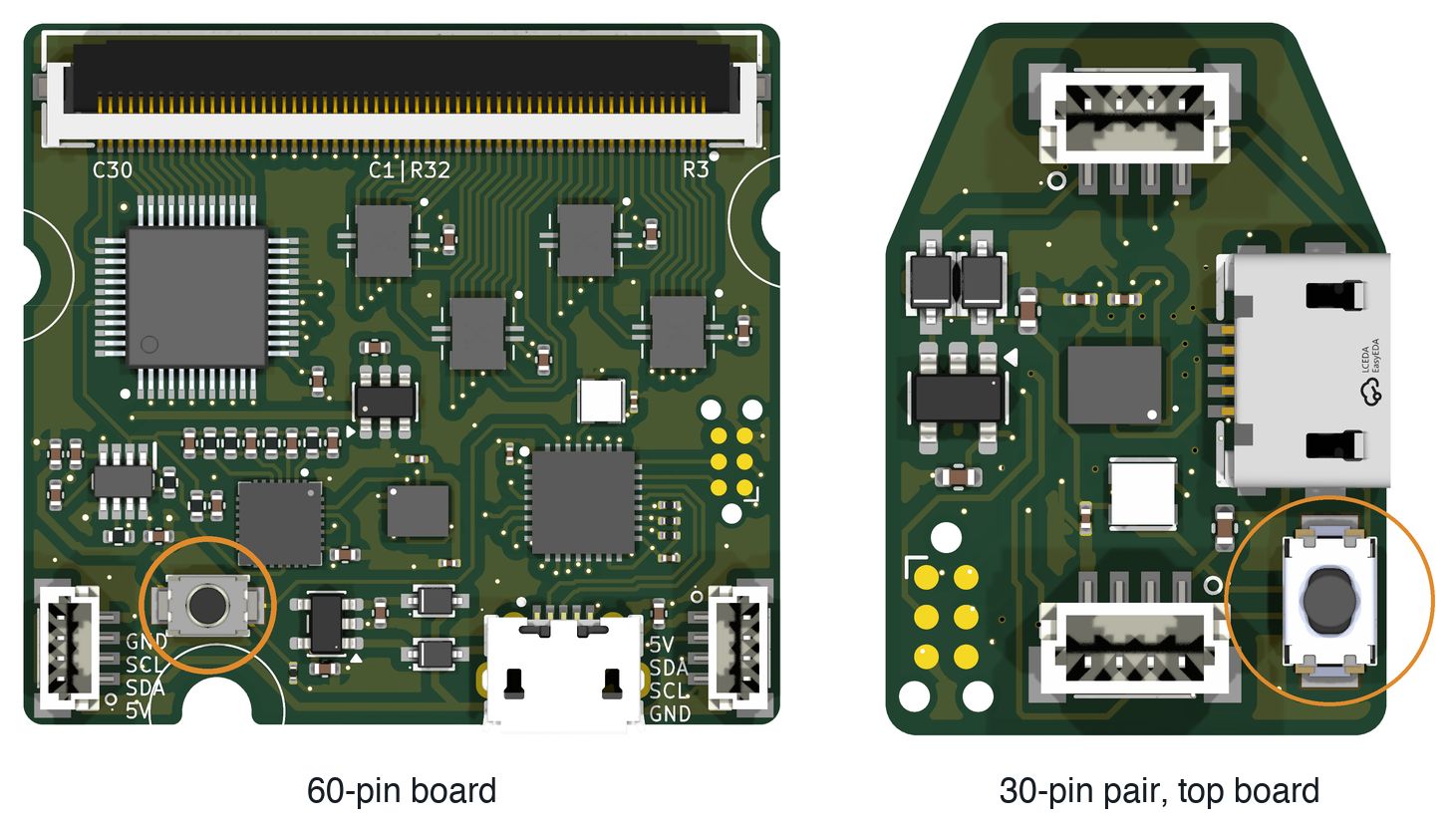
uv run opentac flash --board readout60     # the 60-pin board
uv run opentac flash --board node16        # the 30-pin pair
Do the same if the board's firmware does not answer, or if the board never
appears in the bootloader. A board in the bootloader cannot say which board it
is, so --board is needed there. --board also takes 60pin and 30pin. With --board,
--dry-run prints the command it would run even with no board attached.
dfu-util may print Error during download get_status after
Submitting leave request. This is harmless: the firmware is written and the
board has restarted.
The prebuilt files are also packed into the Python wheel, so opentac flash
works when OpenTac is installed with pip instead of run from this repository.
On Linux
Serial-port access and USB bootloader access require separate permissions. Configure each once for the account that will run OpenTac.
The board's serial port (/dev/ttyACM0) belongs to the dialout group. If
opentac says it found the port but cannot open it (permission denied), add
yourself to the group, then log out and back in:
The bootloader (USB id 0483:df11) needs a udev rule. If opentac flash
says a board is in the bootloader but this user may not open it, add the rule,
then unplug and replug the board:
echo 'SUBSYSTEMS=="usb", ATTRS{idVendor}=="0483", ATTRS{idProduct}=="df11", MODE="0666"' | sudo tee /etc/udev/rules.d/50-opentac-dfu.rules
sudo udevadm control --reload-rules && sudo udevadm trigger
2. Arduino IDE
Install the required tools and pinned dependencies:
- Arduino IDE 2.
- In Settings, add this to Additional boards manager URLs:
https://github.com/stm32duino/BoardManagerFiles/raw/main/package_stmicroelectronics_index.json - Boards Manager: install STM32 MCU based boards, version 2.7.1.
- Library Manager: install STM32duino LSM6DSV16BX (1.0.0) and Adafruit NeoPixel (1.15.5).
- STM32CubeProgrammer from st.com. The IDE uploads with it.
Configure and upload the firmware:
- Open
firmware/opentac_readout/opentac_readout.ino. - At the top of the file, delete the
//in front of your board's line, for example#define OT_BOARD_READOUT60. - In the Tools menu set:
- Board: Generic STM32G4 series
- Board part number: Generic G431KBUx
- U(S)ART support: Enabled (generic 'Serial')
- USB support: CDC (generic 'Serial' supersede U(S)ART)
- USB speed: Low/Full Speed
- Upload method: STM32CubeProgrammer (DFU)
- Open the Serial Monitor, set the line ending to Newline, type
Band send it. The board's port disappears; that is expected. - Click Upload.
3. arduino-cli
Install the pinned STM32 core using arduino-cli 1.x:
arduino-cli config add board_manager.additional_urls https://github.com/stm32duino/BoardManagerFiles/raw/main/package_stmicroelectronics_index.json
arduino-cli core update-index
arduino-cli core install STMicroelectronics:stm32@2.7.1
Build every board's firmware into firmware/build/:
firmware/build.sh              # every target
firmware/build.sh readout60    # one: readout60, node16, node16_bus, bus_controller
build.sh installs the two Arduino libraries into firmware/build/arduino/
on its first run, so it does not touch your own sketchbook. Its output is
byte-for-byte the same as the files in firmware/prebuilt/
(firmware/prebuilt/SHA256SUMS).
To compile one board yourself, install the libraries once, then choose the
board with a compiler flag passed as build.extra_flags:
arduino-cli lib install "STM32duino LSM6DSV16BX@1.0.0" "Adafruit NeoPixel@1.15.5"
arduino-cli compile \
  --fqbn 'STMicroelectronics:stm32:GenG4:pnum=GENERIC_G431KBUX,usb=CDCgen,xusb=FS,xserial=generic' \
  --build-property 'build.extra_flags=-DOT_BOARD_READOUT60' \
  --output-dir firmware/build/manual firmware/opentac_readout
That writes firmware/build/manual/opentac_readout.ino.bin. Then flash a
binary, for example the one build.sh made:
or by hand, after sending B to the board:
Configure the sensor
After flashing, upload the sensor manifest and verify the live response using Read a sensor.