Daisy-chain readout boards
Multiple 30-pin readout boards can share one USB connection through a Teensy 4.0 controller. The boards communicate with the controller over I²C, while the host uses the same sensor-configuration and readout interfaces as for a board connected directly over USB.
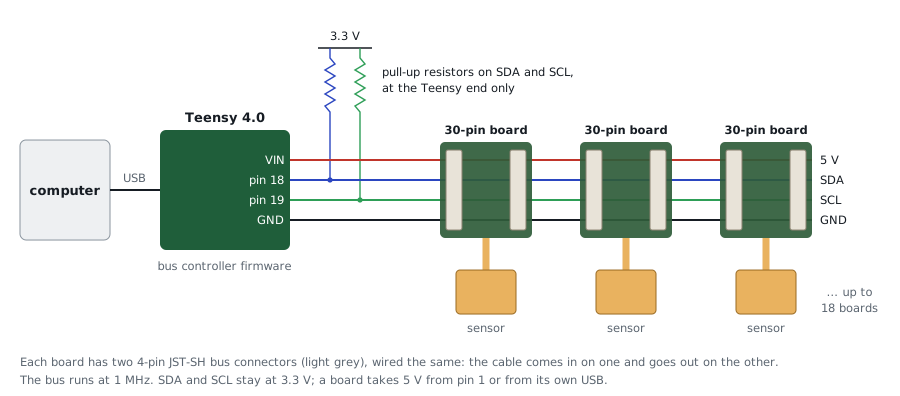
The controller supports up to 18 nodes on a 1 MHz bus. In a test with three 30-pin boards, 7,213 bus transactions completed without errors. With two boards streaming, the measured rate was approximately 240 frames/s per board.
1. Flash every board for the bus
Plug each board in by its own USB cable, one at a time, and flash the bus version of the firmware:
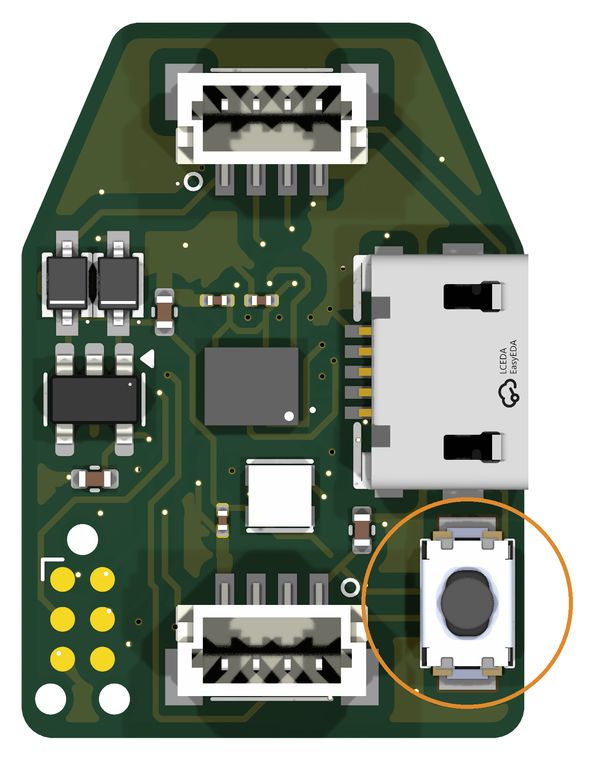
A new board has no firmware yet: hold its BOOT0 button while plugging it in,
then run the same command. The bus firmware still answers B on USB, so the
same command reflashes it later.
In the Arduino IDE, add a file named build_opt.h next to
opentac_readout.ino containing this one line, then upload as in
Flash the firmware:
The flags must reach every file the build compiles, not only the sketch, or
the I²C driver keeps a 32-byte buffer and cuts every frame short. build_opt.h
does that in the IDE; firmware/build.sh passes them as build.extra_flags.
Delete build_opt.h again before building a normal USB firmware.
2. Flash the Teensy
Load firmware/prebuilt/bus_controller.hex with the Teensy Loader. Or, in the
Arduino IDE with Teensyduino: copy firmware/libraries/OpenTactileBus into
your Arduino libraries folder, open firmware/bus_controller/bus_controller.ino,
choose Board Teensy 4.0 and USB Type Serial, and click Upload.
3. Connect the I²C bus
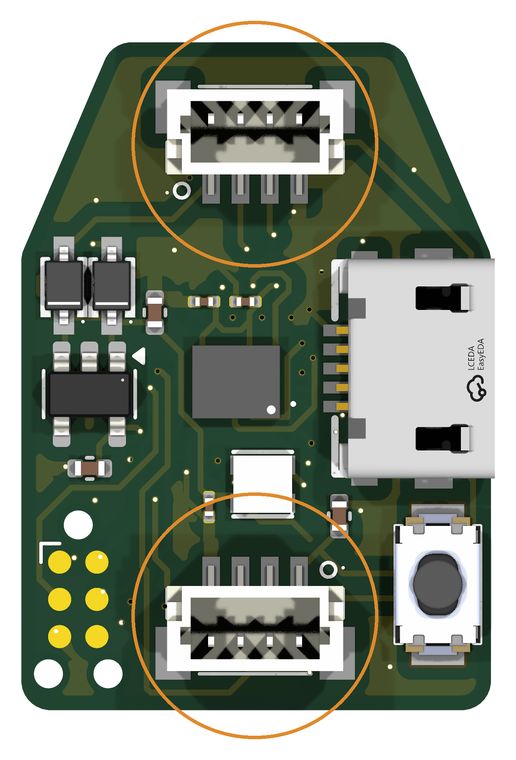
Each board has two 4-pin JST-SH bus connectors, wired the same way, so the cable goes in on one and out on the other:
| Pin | Signal | Teensy 4.0 |
|---|---|---|
| 1 | 5 V | VIN (USB power) |
| 2 | SDA | pin 18 |
| 3 | SCL | pin 19 |
| 4 | GND | GND |
- Fit one pair of pull-up resistors, SDA and SCL to 3.3 V, at the Teensy end only. The boards have none on the bus.
- The Teensy is 3.3 V and not 5 V tolerant: keep SDA and SCL at 3.3 V.
- A board takes 5 V from either its own USB or pin 1 (each through a diode), so you can unplug the boards' own USB cables once they are flashed.
4. Set up each sensor
uv run opentac info                                  # lists the boards (nodes) on the bus
uv run opentac setup palm.zip --node pick            # choose the board by its LED
uv run opentac setup thumb.zip --node 1              # or by node number
With --node pick, one board's LED lights red. Press Space until the red LED
is on the board that sensor is plugged into, then Enter. Each board remembers
its sensor; a board that restarts keeps its node number.
5. View and read multiple sensors
Each board's LED takes the colour of its panel's title.
from opentac.device import Bus

with Bus() as bus:
    for s in bus:                         # one Sensor per board
        print(s.node, s.manifest.name)
    for node, frame in bus.frames():      # every board's frames, as they arrive
        print(node, frame.t_us, frame.taxels.max())
frame.t_us uses the Teensy's clock in microseconds, placing frames from all nodes on a common time base. This supports temporal alignment across sensors; it does not imply that their taxels are sampled simultaneously. Use Sensor(node=2) to access one board on the bus.
Bus limitations
Only run the OpenTac bus controller firmware against these boards. A controller that reads more bytes than a board sends makes the board hold SCL low, and the bus remains blocked until the boards are power-cycled.
The bus firmware is for the 30-pin board only. A 60-pin board needs more memory for its frame buffers than its firmware has left.