Readout boards
OpenTac provides two readout-board designs: a 60-pin board for sensors with up to 30 rows and 30 columns, and a compact 30-pin pair for up to 15 rows and 15 columns. Both use the same firmware codebase and USB interface, with the sensor-specific layout supplied through its manifest.
Use the 60-pin board for most sensors. Use the 30-pin pair where space is tight, such as inside a finger or a small gripper. The limit is per direction: the 60-pin board takes up to 30 rows and 30 columns, the 30-pin pair up to 15 and 15.
Firmware
| Board | Firmware |
|---|---|
| 60-pin board | READOUT60 |
| 30-pin pair (two stacked boards) | NODE16, or NODE16_bus for each board in a daisy chain (Daisy-chain boards) |
Prebuilt binaries for both boards are in firmware/prebuilt/; opentac flash picks the right one (Flash the firmware).
Readout architecture and interfaces
-
Zero-potential scanning suppresses crosstalk. Each taxel is a resistive connection between a row and a column. In a passive matrix with floating, unselected rows, current can reach the measured column through other pressed taxels. The result is an apparent response at a location that was not pressed, often called ghosting.
The readout drives the selected row to the supply voltage and grounds the remaining rows. A multiplexer connects the selected column to an inverting amplifier whose non-inverting input is grounded, holding the measured column near virtual ground. The other taxels on that column therefore have approximately zero voltage across them and conduct negligible current. Current through other pressed taxels flows into the grounded rows rather than into the amplifier, so each reading reflects only the taxel at the driven row and selected column. The resistor-network animation below illustrates this mechanism.
Animation: a 4 × 4 sensor with three taxels pressed, read with the other rows left open, then held at 0 V. The currents come from a resistor model of the grid, as in How it works. -
Inertial measurements. Each board carries an ST LSM6DSV16BX inertial sensor. The firmware streams its accelerometer for vibration, at up to 1920 Hz (960 Hz by default), and its orientation as a quaternion computed on the chip by its own sensor-fusion block, at up to 480 Hz (240 Hz by default). On a gripper or a fingertip, that adds vibration and orientation alongside the tactile frames, from the same board.
Recorded on a gripper finger turning toward a can and grasping it, at recorded speed: the board's orientation from its IMU's quaternion, the vibration its accelerometer picks up, and the tactile frame from the same board. -
Multiple sensors over an I2C bus. Each board has two 4-pin JST-SH connectors (5 V, GND, SCL, SDA). Chain several 30-pin boards with JST-SH cables and read them all through one controller, a Teensy 4.0, to cover a whole hand or several fingers from one USB port. See Daisy-chain boards. Chaining runs on the 30-pin boards; the 60-pin board has the connectors too, but the frame buffers for a 30 × 30 sensor do not fit in a chain node's memory.
Illustration: three 30-pin pairs chained with JST-SH cables to a Teensy 4.0, the only board on USB. Each board's LED takes its panel's colour in opentac view. -
USB communication and firmware updates. A micro-USB cable connects the board to the computer. It shows up as a serial port, with no adapter or programmer, and the same cable flashes new firmware (Flash the firmware).
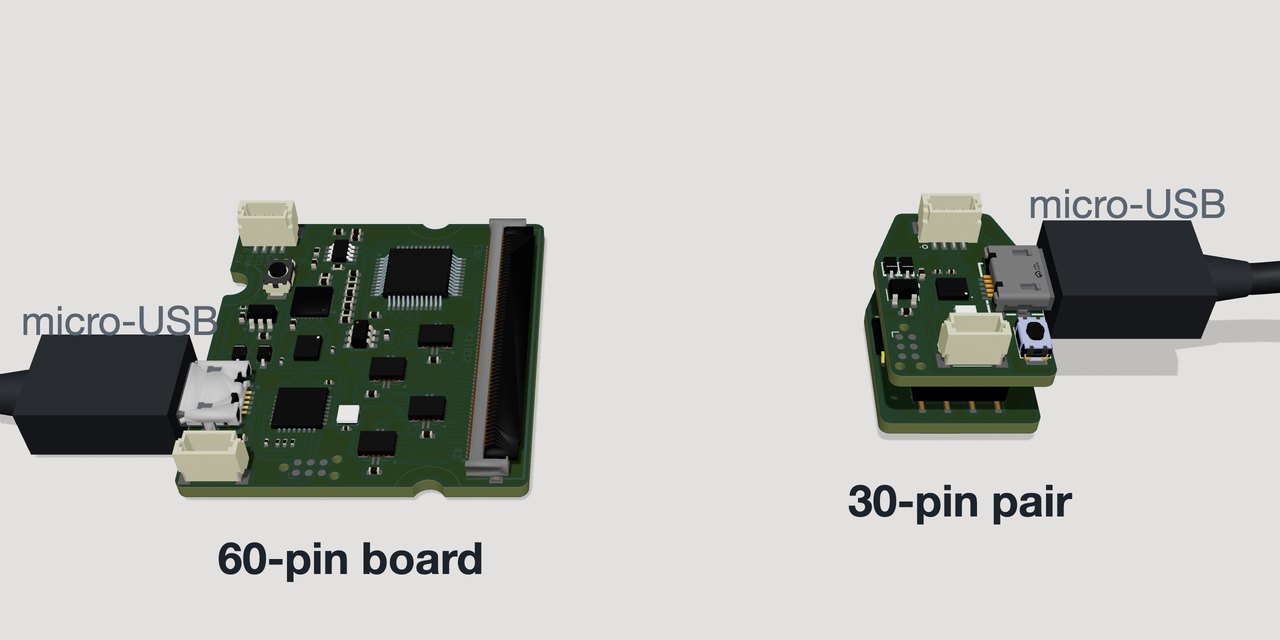
The 60-pin board and the 30-pin pair, each with a micro-USB cable plugged in. -
Board dimensions and component placement. The 60-pin board is 37 × 34.3 mm. The 30-pin version splits the circuit over two 16 × 22.8 mm boards stacked on 1.27 mm headers: the bottom board carries the sensor connector and the analog front end, the top board the microcontroller, IMU, USB and daisy-chain connectors.
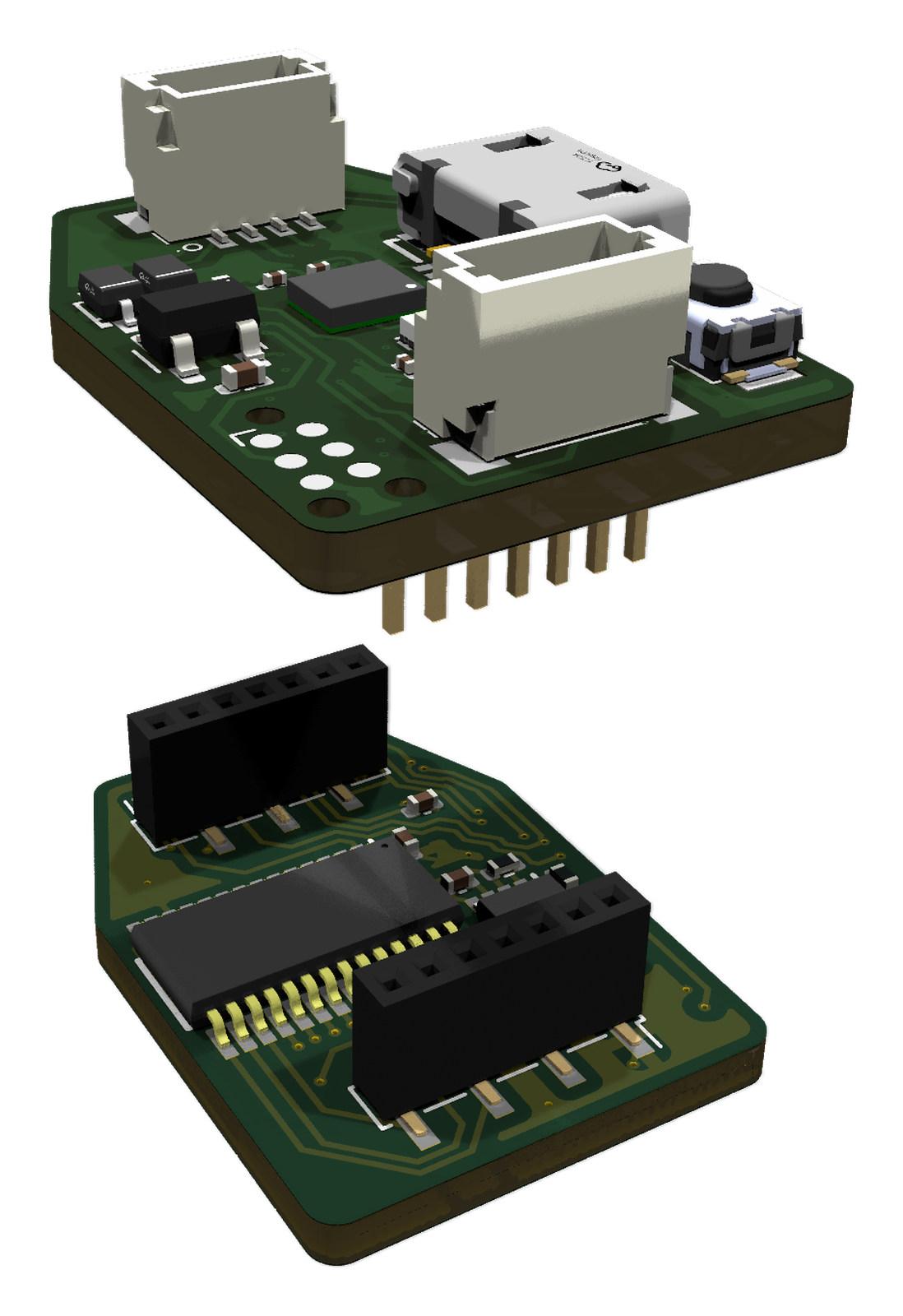
Exploded view of the 30-pin pair, showing the sensor interface below the controller board.
Specifications
| 60-pin board | 30-pin pair | |
|---|---|---|
| Largest sensor | 30 rows × 30 columns | 15 rows × 15 columns |
| Size | 37 × 34.3 mm | two boards, 16 × 22.8 mm, stacked |
| Sensor connector | Molex 505110-6091, 60 positions, 0.5 mm pitch | Molex 505110-3091, 30 positions, 0.5 mm pitch |
| Connector pads | 1–30 rows, 31–60 columns | 1–15 columns, 16–30 rows |
| Microcontroller | STM32G431 | STM32G431 |
| Row drive | four 74HC595 shift registers | two 74HC595 shift registers |
| Column select | ADG732 (32:1) | ADG706 (16:1) |
| Gain | 16 settings: four feedback resistors switched in by a MAX14662 over I2C (Gain) | fixed |
| IMU | LSM6DSV16BX | LSM6DSV16BX |
| Computer link | micro-USB, serial | micro-USB, serial |
| Daisy chain | 2 × JST-SH 4-pin fitted (daisy-chaining runs on the 30-pin pair) | 2 × JST-SH 4-pin, I2C |
| Copper layers | 4 | 4 (top), 2 (bottom) |
| Files | hardware/readout_60pin/ |
hardware/readout_30pin/ |
The connector is a bottom-contact ZIF type that takes a 0.30 mm thick flex end, which is why the sensor's tail carries a stiffener.
Files and ordering
Each board's folder in the repository (hardware/readout_60pin, hardware/readout_30pin) has the KiCad project (schematic and layout) and a production/ folder ready for JLCPCB assembly: a Gerber ZIP, a bill of materials with LCSC part numbers, and a placement (CPL) file. Order the readout board walks through the order.